The navigation contains tabbed sections used to create tagsets, search and review variables, access codebook information, and save or download custom data sets along with links to additional resources.
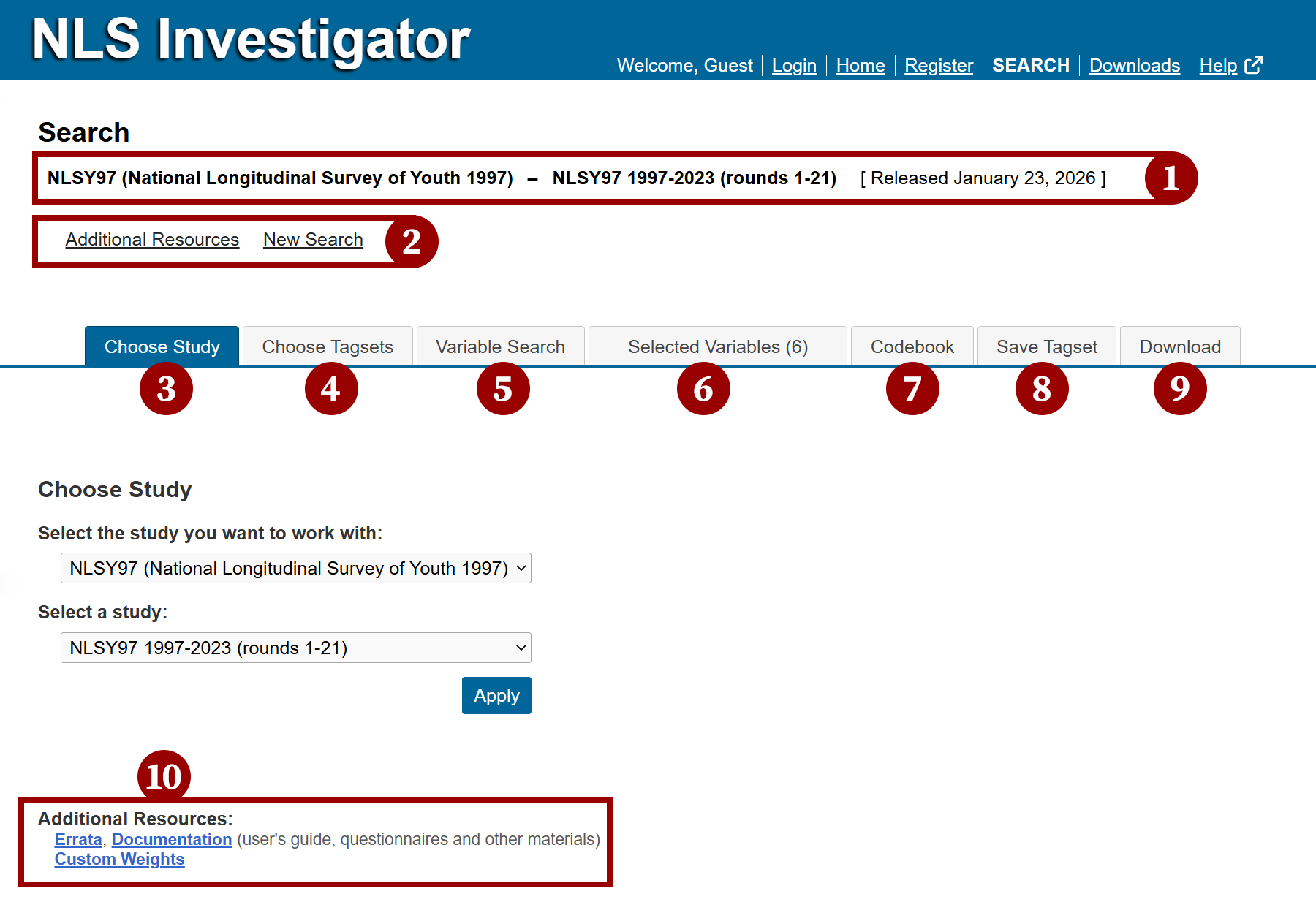
- Selected Study spans across the top of the page under the main menu and lists the selected cohort data currently loaded into the NLS Investigator, including the number of rounds and the date for the most recent data release. This appears once the study has been chosen.
- Note: #1 and #2 are in a banner area that remains in view regardless of the selected tab section below them.
- Additional Resources and New Search links located below the 'selected study' information.
- The 'additional resources' link allows you to quickly return back to the the Choose Study tab where the links for errata, documentation, and custom weights are provided (see #10).
- The 'new search' link will clear out the current selected study, so a new cohort can be chosen. Note: Any unsaved, selected variables will be lost when the chosen study is changed.
- Choose Study tab is the first from the left the a tab panel below the banner area and is where the study is loaded into the NLS Investigator.
- Choose Tagsets tab, second from the left, allows you to open tagsets saved on the server from a registered account or upload tagsets from your computer.
- Variable Search tab, third from the left, is where you search for variables and build a dataset using a variety of search criteria.
- Selected Variables tab, fourth from the left, displays a list of variables selected during your current session.
- Codebook tab, fifth from the left, contains detailed information about each variable and is where you can study the flow of the instrument.
- Save Tagset tab, sixth from the left, allows you to save tagsets on the server with a registered account or download tagsets to your computer.
- Download tab, seventh from the left, allows you to extract selected variables and generate frequency tables.
- Additional resources, located at the bottom of the Choose Study tab, include:
- Errata -a list of known data errors for the selected study.
- Documentation -user's guide, questionnaires, and other materials about the selected study.
- Custom weights -data weights for use with multiple rounds of a selected study. To learn more, visit the NLS Custom Weights page.
The following pages walk through each tab and its features, guiding you through the process of building a custom dataset.
Avoid using the browser back button
Clicking the browser back button will trigger a message asking if you want to leave the page. If you choose to leave, any unsaved searches will be lost.
Next: Choose Study
Previous: Getting Started with NLS Investigator
Quick links: Table of Contents | Glossary of NLS Terms